Key points L'essentiel
A plain text plain text texte brut text encoding encodage du texte Text represented as a sequence of characters alone, with no formatting or layout of its own. A plain-text file opens in any text editor, whatever produced it, which is why interchange formats are written this way: markup languages record structure inside plain text, by writing that structure as characters in the text itself. Texte représenté par la seule suite de ses caractères, sans mise en forme ni mise en page propre. Un fichier en texte brut s'ouvre dans n'importe quel éditeur de texte, quel que soit le logiciel qui l'a produit, ce qui explique que les formats d'échange s'écrivent ainsi : les langages de balisage consignent la structure à l'intérieur du texte brut, en l'écrivant sous forme de caractères dans le texte lui-même. file is characters and nothing else, which is why any text editor opens it.
One of those characters is the line break line break saut de ligne text encoding encodage du texte The character that ends a line in a file, stored in it like any other and invisible on screen. It is what divides a file into lines, so a file's line count is fixed: two of them make three lines, whatever width the window is. Windows writes it as two characters, a carriage return followed by a line feed (CR LF), where macOS and Linux use one (LF). Caractère qui termine une ligne dans un fichier, enregistré comme n'importe quel autre et invisible à l'écran. C'est lui qui découpe le fichier en lignes, si bien que leur nombre est fixe : deux sauts de ligne font trois lignes, quelle que soit la largeur de la fenêtre. Windows l'écrit au moyen de deux caractères, un retour chariot suivi d'un saut de ligne (CR LF), là où macOS et Linux n'en emploient qu'un (LF). , so the number of lines in a file is fixed and countable.
Word wrap word wrap retour à la ligne automatique text encoding encodage du texte A line break added by the program, not typed by the user: when a line reaches the edge of the window, whatever does not fit moves to the next row of the display. Nothing is added to the text itself, so the same text breaks in different places at a different window width, in another program, or at another font size. A line break typed into the text is a character, and it stays where it is. Retour à la ligne ajouté par le logiciel et non tapé par l'utilisateur : quand une ligne atteint le bord de la fenêtre, ce qui ne tient pas passe à la rangée suivante de l'affichage. Rien n'est ajouté au texte lui-même, si bien que le même texte se coupe à d'autres endroits dans une fenêtre d'une autre largeur, dans un autre logiciel ou avec une autre police. Un saut de ligne tapé dans le texte, lui, est un caractère, et il ne bouge pas. only decides where the screen breaks a line. It writes nothing into the file, so the rows you see are not always the lines you have.
Any editor opens it
text encoding encodage du texte Definition Définition · plain text texte brut · fr: texte brut · en : plain text
Text represented as a sequence of characters alone, with no formatting or layout of its own. A plain-text file opens in any text editor, whatever produced it, which is why interchange formats are written this way: markup languages record structure inside plain text, by writing that structure as characters in the text itself. Texte représenté par la seule suite de ses caractères, sans mise en forme ni mise en page propre. Un fichier en texte brut s'ouvre dans n'importe quel éditeur de texte, quel que soit le logiciel qui l'a produit, ce qui explique que les formats d'échange s'écrivent ainsi : les langages de balisage consignent la structure à l'intérieur du texte brut, en l'écrivant sous forme de caractères dans le texte lui-même. (Unicode Consortium, n.d. )
Other attested English terms: plaintext Autres termes anglais attestés : plaintext
Other attested French terms: texte pur Autres termes français attestés : texte pur
You can open a TMX, XLIFF or HTML file in Notepad (Windows) or TextEdit (Mac)
and see how it is put together. No specialized software is needed, because
there is nothing in the file to decode: characters, one after another.
A line break is a character
text encoding encodage du texte Definition Définition · line break saut de ligne · fr: saut de ligne · en : line break
The character that ends a line in a file, stored in it like any other and invisible on screen. It is what divides a file into lines, so a file's line count is fixed: two of them make three lines, whatever width the window is. Windows writes it as two characters, a carriage return followed by a line feed (CR LF), where macOS and Linux use one (LF). Caractère qui termine une ligne dans un fichier, enregistré comme n'importe quel autre et invisible à l'écran. C'est lui qui découpe le fichier en lignes, si bien que leur nombre est fixe : deux sauts de ligne font trois lignes, quelle que soit la largeur de la fenêtre. Windows l'écrit au moyen de deux caractères, un retour chariot suivi d'un saut de ligne (CR LF), là où macOS et Linux n'en emploient qu'un (LF). (Unicode Consortium, n.d. )
Other attested English terms: hard return, newline Autres termes anglais attestés : hard return, newline
Other attested French terms: retour à la ligne forcé, retour forcé, présentation de ligne Autres termes français attestés : retour à la ligne forcé, retour forcé, présentation de ligne
Among those characters is the one that ends a line. You never see it, but it is
in the file like any other, and it is what divides the file into lines. A file
with two of them has three lines, whatever it looks like on screen.
Word processors give you a way to see them: the button usually marked ¶, which
displays the invisible characters on screen, paragraph marks and line breaks
along with spaces and tabs. It changes nothing in the file. It only stops hiding
what is already in it.
Word wrap writes nothing
text encoding encodage du texte Definition Définition · word wrap retour à la ligne automatique · fr: retour à la ligne automatique · en : word wrap
A line break added by the program, not typed by the user: when a line reaches the edge of the window, whatever does not fit moves to the next row of the display. Nothing is added to the text itself, so the same text breaks in different places at a different window width, in another program, or at another font size. A line break typed into the text is a character, and it stays where it is. Retour à la ligne ajouté par le logiciel et non tapé par l'utilisateur : quand une ligne atteint le bord de la fenêtre, ce qui ne tient pas passe à la rangée suivante de l'affichage. Rien n'est ajouté au texte lui-même, si bien que le même texte se coupe à d'autres endroits dans une fenêtre d'une autre largeur, dans un autre logiciel ou avec une autre police. Un saut de ligne tapé dans le texte, lui, est un caractère, et il ne bouge pas.
Other attested English terms: word wrapping, wraparound, soft return Autres termes anglais attestés : word wrapping, wraparound, soft return
Other attested French terms: retour automatique à la ligne, bouclage, renvoi à la ligne Autres termes français attestés : retour automatique à la ligne, bouclage, renvoi à la ligne
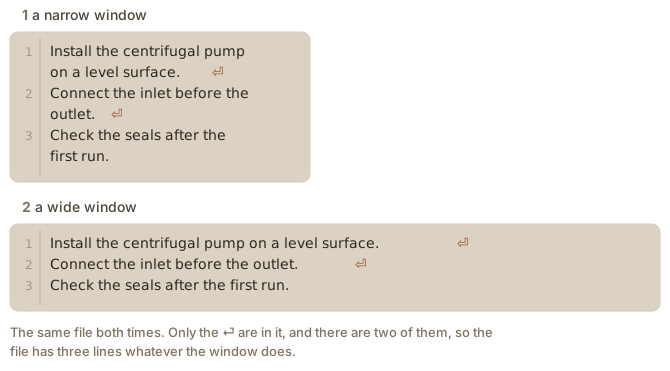
When a line is too long for the window, an editor breaks it so you can read it
without scrolling sideways. That break is drawn, not written: the same file
wraps differently in a narrower window, in another editor, or at a larger font
size, and none of that changes the file.
Figure 1. A narrow window and a wide one, showing the same file. The rows move, the line breaks do not.
The two get confused because both look like a new line. The difference shows the
moment you count something:
Line numbers. An editor numbers the lines in the file, not the rows on
screen, so line 2 can occupy four rows.One record per line. A CSV or TSV file normally puts one record on each
line. A record that wraps on screen is still one record, and a stray line
break inside one splits it in two, unless the field it falls in is quoted.Regular expressions regular expression (regex) expression rationnelle regular expressions expressions rationnelles A pattern describing a set of character strings, built from literal characters and metacharacters with special meanings; used to search, filter and transform text by structure rather than by exact wording. Motif décrivant un ensemble de chaînes de caractères, formé de caractères littéraux et de métacaractères à signification spéciale ; sert à chercher, filtrer et transformer du texte selon sa structure plutôt que selon une formulation exacte. .^ and $ match at a line break in the file, never
where the window happens to end. The page on line anchors teaches
them.XML. A file that arrives on one very long line is intact, which is why
what an XML file looks like says the
indentation is a convention rather than a requirement.
Two characters, not one
Windows ends a line with two characters, a carriage return followed by a line
feed (CR LF), where macOS and Linux use one (LF). Both read as a single line
break, but the extra character is really there: it is why a file can gain or
lose one byte per line when it travels between systems, and why a pattern
written to match the end of a line on one may need to allow for the carriage
return on the other.
Written alternately in EN and FR, translation partly generated in both directions.
Rédigé en alternance en EN et en FR, traduction en partie générée dans les deux sens.
Updated 3 September 2026
Key points L'essentiel
Un fichier en texte brut plain text texte brut text encoding encodage du texte Text represented as a sequence of characters alone, with no formatting or layout of its own. A plain-text file opens in any text editor, whatever produced it, which is why interchange formats are written this way: markup languages record structure inside plain text, by writing that structure as characters in the text itself. Texte représenté par la seule suite de ses caractères, sans mise en forme ni mise en page propre. Un fichier en texte brut s'ouvre dans n'importe quel éditeur de texte, quel que soit le logiciel qui l'a produit, ce qui explique que les formats d'échange s'écrivent ainsi : les langages de balisage consignent la structure à l'intérieur du texte brut, en l'écrivant sous forme de caractères dans le texte lui-même. est fait de caractères et de rien d’autre, et c’est pourquoi n’importe quel éditeur de texte l’ouvre.
L’un de ces caractères est le saut de ligne line break saut de ligne text encoding encodage du texte The character that ends a line in a file, stored in it like any other and invisible on screen. It is what divides a file into lines, so a file's line count is fixed: two of them make three lines, whatever width the window is. Windows writes it as two characters, a carriage return followed by a line feed (CR LF), where macOS and Linux use one (LF). Caractère qui termine une ligne dans un fichier, enregistré comme n'importe quel autre et invisible à l'écran. C'est lui qui découpe le fichier en lignes, si bien que leur nombre est fixe : deux sauts de ligne font trois lignes, quelle que soit la largeur de la fenêtre. Windows l'écrit au moyen de deux caractères, un retour chariot suivi d'un saut de ligne (CR LF), là où macOS et Linux n'en emploient qu'un (LF). : le nombre de lignes d’un fichier est donc fixe, et il se compte.
Le retour à la ligne automatique word wrap retour à la ligne automatique text encoding encodage du texte A line break added by the program, not typed by the user: when a line reaches the edge of the window, whatever does not fit moves to the next row of the display. Nothing is added to the text itself, so the same text breaks in different places at a different window width, in another program, or at another font size. A line break typed into the text is a character, and it stays where it is. Retour à la ligne ajouté par le logiciel et non tapé par l'utilisateur : quand une ligne atteint le bord de la fenêtre, ce qui ne tient pas passe à la rangée suivante de l'affichage. Rien n'est ajouté au texte lui-même, si bien que le même texte se coupe à d'autres endroits dans une fenêtre d'une autre largeur, dans un autre logiciel ou avec une autre police. Un saut de ligne tapé dans le texte, lui, est un caractère, et il ne bouge pas. décide seulement où l’écran coupe une ligne. Il n’écrit rien dans le fichier : les rangées que vous voyez ne sont pas toujours les lignes que vous avez.
N’importe quel éditeur l’ouvre
text encoding encodage du texte Definition Définition · plain text texte brut · fr: texte brut · en : plain text
Text represented as a sequence of characters alone, with no formatting or layout of its own. A plain-text file opens in any text editor, whatever produced it, which is why interchange formats are written this way: markup languages record structure inside plain text, by writing that structure as characters in the text itself. Texte représenté par la seule suite de ses caractères, sans mise en forme ni mise en page propre. Un fichier en texte brut s'ouvre dans n'importe quel éditeur de texte, quel que soit le logiciel qui l'a produit, ce qui explique que les formats d'échange s'écrivent ainsi : les langages de balisage consignent la structure à l'intérieur du texte brut, en l'écrivant sous forme de caractères dans le texte lui-même. (Unicode Consortium, n.d. )
Other attested English terms: plaintext Autres termes anglais attestés : plaintext
Other attested French terms: texte pur Autres termes français attestés : texte pur
Vous pouvez ouvrir un fichier TMX, XLIFF ou HTML dans le Bloc-notes (Windows) ou
TextEdit (Mac) et voir comment il est construit. Aucun logiciel spécialisé n’est
nécessaire, parce qu’il n’y a rien à décoder dans le fichier : des caractères,
les uns après les autres.
Le saut de ligne est un caractère
text encoding encodage du texte Definition Définition · line break saut de ligne · fr: saut de ligne · en : line break
The character that ends a line in a file, stored in it like any other and invisible on screen. It is what divides a file into lines, so a file's line count is fixed: two of them make three lines, whatever width the window is. Windows writes it as two characters, a carriage return followed by a line feed (CR LF), where macOS and Linux use one (LF). Caractère qui termine une ligne dans un fichier, enregistré comme n'importe quel autre et invisible à l'écran. C'est lui qui découpe le fichier en lignes, si bien que leur nombre est fixe : deux sauts de ligne font trois lignes, quelle que soit la largeur de la fenêtre. Windows l'écrit au moyen de deux caractères, un retour chariot suivi d'un saut de ligne (CR LF), là où macOS et Linux n'en emploient qu'un (LF). (Unicode Consortium, n.d. )
Other attested English terms: hard return, newline Autres termes anglais attestés : hard return, newline
Other attested French terms: retour à la ligne forcé, retour forcé, présentation de ligne Autres termes français attestés : retour à la ligne forcé, retour forcé, présentation de ligne
Parmi ces caractères, il y en a un qui termine la ligne. Vous ne le voyez jamais,
mais il est dans le fichier comme les autres, et c’est lui qui découpe le fichier
en lignes. Un fichier qui en compte deux a trois lignes, quelle que soit son
allure à l’écran.
Les traitements de texte offrent un moyen de les voir : le bouton marqué 
d’ordinaire, qui affiche à l’écran les caractères invisibles, marques de
paragraphe et sauts de ligne, mais aussi espaces et tabulations. Il ne change
rien au fichier. Il cesse seulement de cacher ce qui s’y trouve déjà.
Le retour à la ligne automatique n’écrit rien
text encoding encodage du texte Definition Définition · word wrap retour à la ligne automatique · fr: retour à la ligne automatique · en : word wrap
A line break added by the program, not typed by the user: when a line reaches the edge of the window, whatever does not fit moves to the next row of the display. Nothing is added to the text itself, so the same text breaks in different places at a different window width, in another program, or at another font size. A line break typed into the text is a character, and it stays where it is. Retour à la ligne ajouté par le logiciel et non tapé par l'utilisateur : quand une ligne atteint le bord de la fenêtre, ce qui ne tient pas passe à la rangée suivante de l'affichage. Rien n'est ajouté au texte lui-même, si bien que le même texte se coupe à d'autres endroits dans une fenêtre d'une autre largeur, dans un autre logiciel ou avec une autre police. Un saut de ligne tapé dans le texte, lui, est un caractère, et il ne bouge pas.
Other attested English terms: word wrapping, wraparound, soft return Autres termes anglais attestés : word wrapping, wraparound, soft return
Other attested French terms: retour automatique à la ligne, bouclage, renvoi à la ligne Autres termes français attestés : retour automatique à la ligne, bouclage, renvoi à la ligne
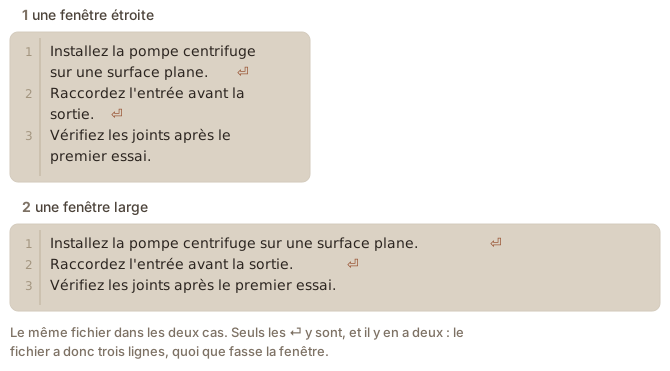
Quand une ligne est trop longue pour la fenêtre, l’éditeur la coupe pour vous
éviter de défiler latéralement. Cette coupure est dessinée, pas écrite : le même
fichier se replie autrement dans une fenêtre plus étroite, dans un autre éditeur
ou avec une police plus grande, et rien de tout cela ne change le fichier.
Figure 1. Une fenêtre étroite et une fenêtre large, pour le même fichier. Les rangées bougent, les sauts de ligne restent.
On confond les deux parce que l’une comme l’autre ressemble à une nouvelle ligne.
La différence apparaît dès qu’il faut compter :
Deux caractères, pas un
Windows termine une ligne par deux caractères, un retour chariot suivi d’un
saut de ligne (CR LF), là où macOS et Linux n’en emploient qu’un (LF). Les deux
se lisent comme un seul saut de ligne, mais le caractère supplémentaire est
bien réel : c’est pourquoi un fichier peut gagner ou perdre un octet par ligne
en passant d’un système à l’autre, et pourquoi un motif écrit pour trouver la
fin d’une ligne sur l’un doit parfois tenir compte du retour chariot sur
l’autre.
Written alternately in EN and FR, translation partly generated in both directions.
Rédigé en alternance en EN et en FR, traduction en partie générée dans les deux sens.
Mise à jour 3 septembre 2026