Literal characters and the dotCaractères littéraux et le point
A character standing for itself
The basis of regular expressions is simple: an ordinary character matches
itself. Type /regex/ into a tester and you find every occurrence of “regex”
in the text.
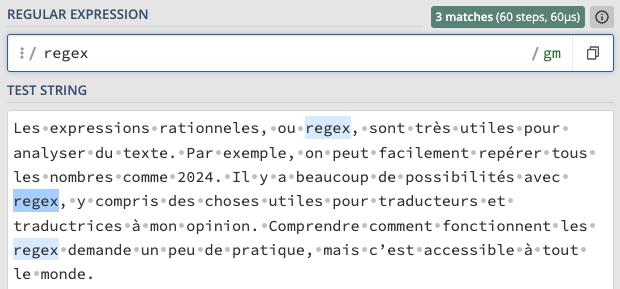
Three things to note here:
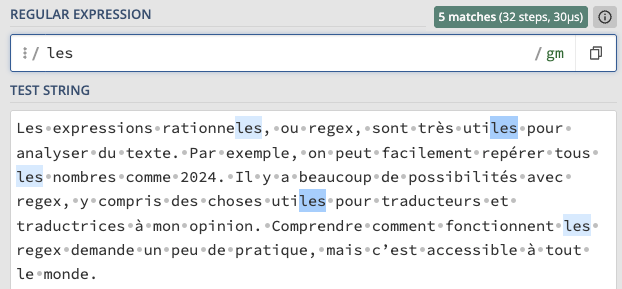
- The search is case-sensitive:
/les/finds “les” but not “Les”. - Matches are not limited to whole words:
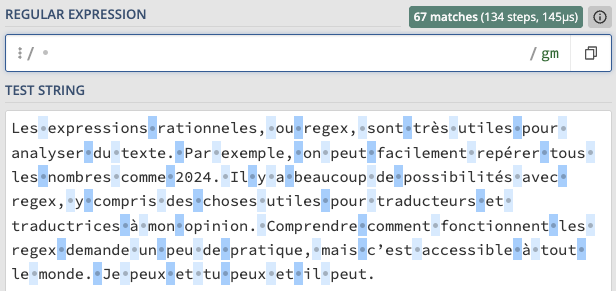
/les/also finds the last three characters of “marbles”. - Spaces match themselves too:
/ /finds every space in the text, one at a time.
The dot, the first metacharacter
The dot (.) is a wildcard.
It matches any single character except a line break line breaksaut de ligne text encodingencodage du texte The character that ends a line in a file, stored in it like any other and invisible on screen. It is what divides a file into lines, so a file's line count is fixed: two of them make three lines, whatever width the window is. Windows writes it as two characters, a carriage return followed by a line feed (CR LF), where macOS and Linux use one (LF).Caractère qui termine une ligne dans un fichier, enregistré comme n'importe quel autre et invisible à l'écran. C'est lui qui découpe le fichier en lignes, si bien que leur nombre est fixe : deux sauts de ligne font trois lignes, quelle que soit la largeur de la fenêtre. Windows l'écrit au moyen de deux caractères, un retour chariot suivi d'un saut de ligne (CR LF), là où macOS et Linux n'en emploient qu'un (LF). .
/20../ finds “2024”, “2025”, “20ab”, any run of “20” followed by two
characters of any kind.
The dot is the first metacharacter we see in this module, and the principle is the same as for the others: an ordinary keyboard character has a special meaning inside the regular expression.
The tool fixed the file and fixes the next one. A fix is a fix.Je peux traduire, mais il ne peut pas. Peu importe. peux peut fixed fixes Un caractère pour lui-même
La base des expressions rationnelles est très simple : un caractère ordinaire
correspond à lui-même. Tapez /regex/ dans un testeur, et vous trouvez toutes
les occurrences de « regex » dans le texte.
Trois choses à noter ici :
- La recherche est sensible à la casse :
/les/trouve « les » mais pas « Les ». - Les correspondances ne sont pas limitées aux mots entiers :
/les/trouve aussi les trois derniers caractères de « utiles ». - Les espaces correspondent aussi à elles-mêmes :
/ /trouve chaque espace du texte, une par une.
Le point, premier métacaractère
Le point (.) est un joker.
Il correspond à n’importe quel caractère unique, sauf un
saut de ligne line breaksaut de ligne text encodingencodage du texte The character that ends a line in a file, stored in it like any other and invisible on screen. It is what divides a file into lines, so a file's line count is fixed: two of them make three lines, whatever width the window is. Windows writes it as two characters, a carriage return followed by a line feed (CR LF), where macOS and Linux use one (LF).Caractère qui termine une ligne dans un fichier, enregistré comme n'importe quel autre et invisible à l'écran. C'est lui qui découpe le fichier en lignes, si bien que leur nombre est fixe : deux sauts de ligne font trois lignes, quelle que soit la largeur de la fenêtre. Windows l'écrit au moyen de deux caractères, un retour chariot suivi d'un saut de ligne (CR LF), là où macOS et Linux n'en emploient qu'un (LF). . /20../ trouve « 2024 », « 2025 »,
« 20ab », n’importe quelle suite de « 20 » et de deux caractères quelconques.
Le point est le premier métacaractère que nous voyons dans ce module, et le principe est le même que pour les autres : un caractère ordinaire du clavier prend une signification spéciale à l’intérieur de l’expression rationnelle.
The tool fixed the file and fixes the next one. A fix is a fix.Je peux traduire, mais il ne peut pas. Peu importe. peux peut fixed fixes Sources
- MDN Web Docs (n.d.). Regular expressions. MDN JavaScript Guide, Mozilla. https://developer.mozilla.org/en-US/docs/Web/JavaScript/Guide/Regular_expressions
Sources
- MDN Web Docs (n.d.). Regular expressions. MDN JavaScript Guide, Mozilla. https://developer.mozilla.org/en-US/docs/Web/JavaScript/Guide/Regular_expressions